
How to Set Up SolrCloud with ZooKeeper for Sitecore on Windows
A Solr dashboard with green nodes is not a cluster you can trust. The real test is what happens when one node goes offline, or Sitecore starts a rebuild.
Sitecore leans on search for content management, publishing, delivery, and personalization. SolrCloud is the usual way to give those indexes high availability: several Solr nodes, an external ZooKeeper ensemble for coordination, HTTPS in front, and a private load balancer so Sitecore never talks to a single host.
This walkthrough is a Windows lab you can take into a real environment:
- Java 17 on every Solr and ZooKeeper server
- Five external ZooKeeper members
- Solr 9.8.1 in cloud mode (Sitecore XP 10.4.1 documents this pairing — confirm it for your update)
- HTTPS before the first node joins
- NSSM Windows services with log redirection
- Collections, aliases, and Sitecore switch-on-rebuild
Host names and paths below are placeholders. Use your DNS, certificates, and approved binaries. Do not mix Command Prompt (^ continuation) and PowerShell in one command.
What you are building
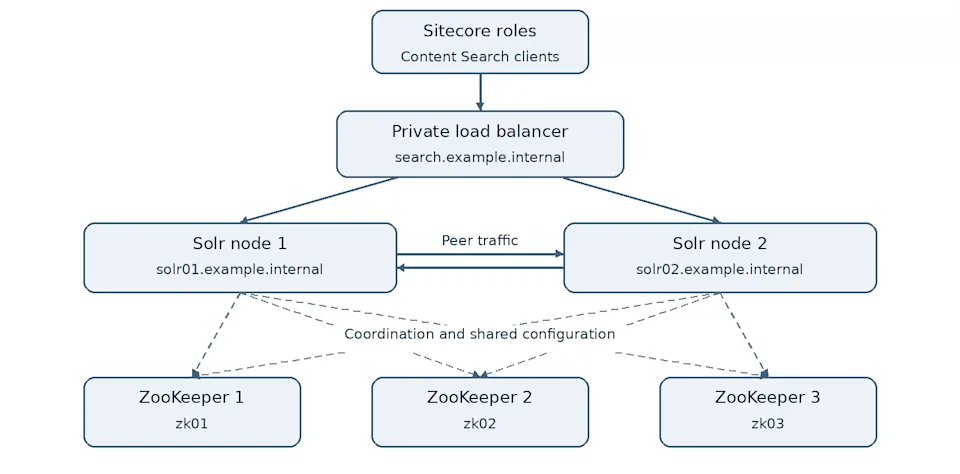
Sitecore → private load balancer → a healthy Solr node
Solr nodes talk to each other and to ZooKeeper. The load balancer protects the Sitecore entry point. It does not replace replicas or ZooKeeper quorum.
| Term | Meaning |
|---|---|
| Collection | Logical index |
| Shard | One slice of that index |
| Replica | A copy of a shard |
| Alias | Stable name that can point at a collection |
| Chroot / namespace | ZooKeeper path that isolates Solr metadata, typically /solr |
Five ZooKeeper voters need three members for quorum. Put them in separate failure domains. Apache recommends an external ensemble in production rather than Solr’s embedded ZooKeeper.
Example names:
| Component | Example |
|---|---|
| ZooKeeper | zk01 … zk05 |
| Solr | solr01.example.internal, solr02.example.internal, solr03.example.internal |
| Load balancer | search.example.internal |
| Paths | C:\zookeeper, C:\solr\solr-9.8.1 |
| Namespace | /solr |
Open only the ports you need on a private network: 2181 (ZooKeeper clients), 2888/3888 (ZooKeeper peers), 8983 (Solr HTTPS), 443 (Sitecore → load balancer). Do not expose ZooKeeper or Solr admin to the public internet.
Inventory every index first (core, master, web, custom, modules). Treat xConnect as a separate rebuild.
Stack used in this walkthrough
| Component | Version |
|---|---|
| Windows Server | 2019 / 2022 |
| Java | JDK 17 |
| Apache ZooKeeper | 3.8.x (external ensemble) |
| Apache Solr | 9.8.1 |
| NSSM | 2.24 |
Solr 9.8.1 can ship with a newer bundled ZooKeeper. This article uses an external 3.8.x ensemble so Solr and ZooKeeper can fail independently. Pick one pairing, verify it against Sitecore’s compatibility table, and stay consistent.
1. Java 17
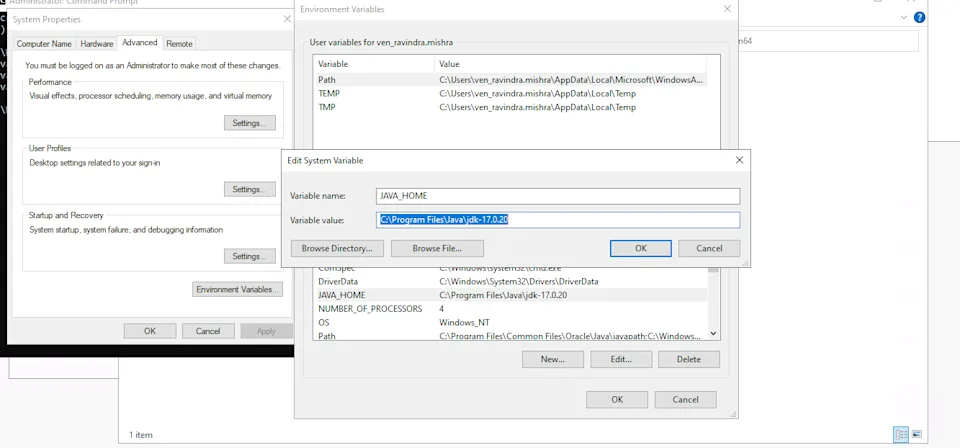
Install the approved 64-bit JDK 17 on every Solr and ZooKeeper server. Set a system JAVA_HOME (for example C:\Program Files\Java\jdk-17.0.20), add %JAVA_HOME%\bin to the system Path, apply the change, and restart the host so Windows services see the same environment as your shell.
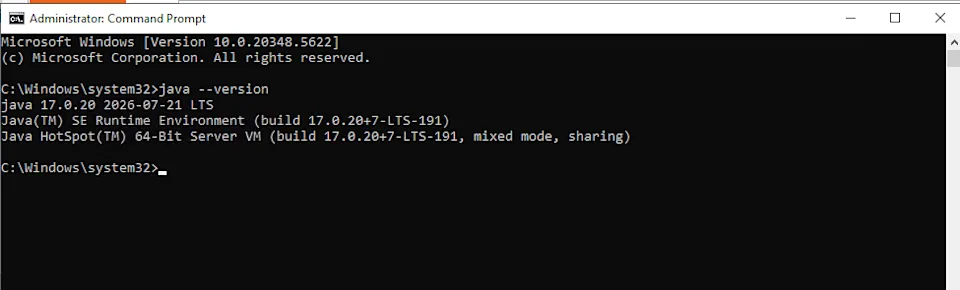
Verify from an elevated Command Prompt:
java -version
You want a 64-bit HotSpot build, not a leftover Java 8 on PATH.
Confirm DNS as well:
$env:JAVA_HOME
Get-Command java
Resolve-DnsName zk01
Resolve-DnsName solr01.example.internal
Use real DNS that points at the intended hosts. Mapping a cluster name to 127.0.0.1 will break peer communication even if Solr Admin “works” in a browser on that box. Certificates must cover the DNS names you advertise in SOLR_HOST.
Download Solr and ZooKeeper from Apache, verify checksums, and record the exact maintenance releases.
2. ZooKeeper ensemble
Extract apache-zookeeper-*-bin to C:\zookeeper on each member. Create C:\zookeeper\data. Copy conf\zoo_sample.cfg to conf\zoo.cfg and keep the same cluster definition on every node:
tickTime=10000
initLimit=10
syncLimit=5
dataDir=C:/zookeeper/data
clientPort=2181
4lw.commands.whitelist=ruok,mntr,stat,srvr,conf
admin.enableServer=true
admin.serverPort=8080
server.1=zk01:2888:3888
server.2=zk02:2888:3888
server.3=zk03:2888:3888
server.4=zk04:2888:3888
server.5=zk05:2888:3888
tickTime=10000 is more forgiving on Windows than the 2000 ms sample. If you enable the ZooKeeper admin port, keep it on the private network.
Create myid (plain file, not myid.txt). On zk01:
New-Item -ItemType Directory -Force C:\zookeeper\data
Set-Content C:\zookeeper\data\myid -Value '1' -Encoding Ascii
Get-Content C:\zookeeper\data\myid
Use 2 through 5 on the other members. If Windows saved myid.txt:
Rename-Item C:\zookeeper\data\myid.txt -NewName myid
Do not clone another member’s data directory.
Allow the ensemble ports:
New-NetFirewallRule -DisplayName "ZooKeeper 2181" -Direction Inbound -Protocol TCP -LocalPort 2181 -Action Allow
New-NetFirewallRule -DisplayName "ZooKeeper 2888" -Direction Inbound -Protocol TCP -LocalPort 2888 -Action Allow
New-NetFirewallRule -DisplayName "ZooKeeper 3888" -Direction Inbound -Protocol TCP -LocalPort 3888 -Action Allow
Start one member from Command Prompt and confirm it can form a cluster once the others are up:
cd /d C:\zookeeper
bin\zkServer.cmd
Connect:
C:\zookeeper\bin\zkCli.cmd -server zk01:2181
At the prompt: ls / then quit. You should see [zookeeper]. You want one leader and four followers. A TCP connect or ruok alone is not enough.
Create the Solr chroot once:
create /solr ""
ls /
quit
Expected: [solr, zookeeper]. You can also create it later with solr.cmd zk mkroot. A cluster started with .../solr is not the same as one without it — pick the namespace and use it everywhere.
3. NSSM service for ZooKeeper
Stop the manual process. From an elevated prompt in the NSSM win64 folder:
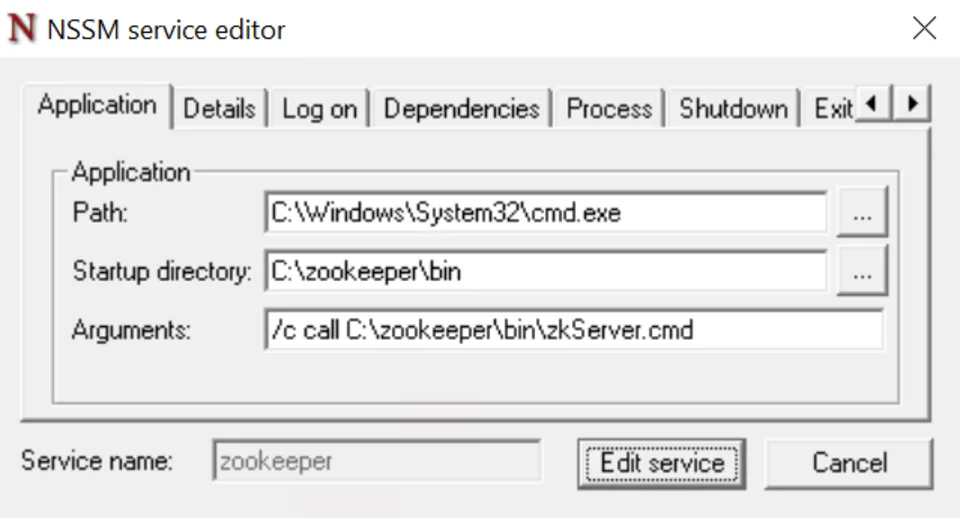
nssm install zookeeper
| Setting | Value |
|---|---|
| Path | C:\Windows\System32\cmd.exe |
| Startup directory | C:\zookeeper\bin |
| Arguments | /c call C:\zookeeper\bin\zkServer.cmd |
On the I/O tab, send stdout/stderr to files you can rotate:
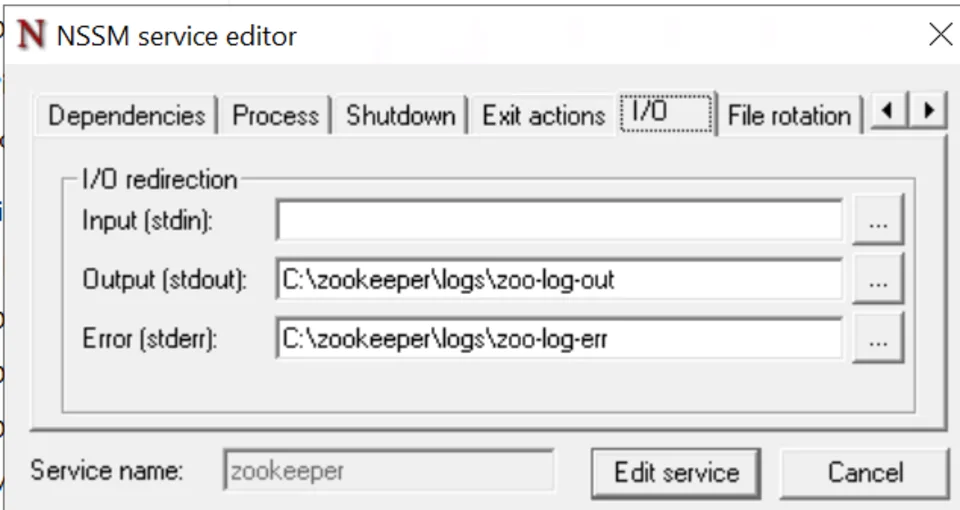
Create C:\zookeeper\logs first. Install the service, then:
nssm start zookeeper
Use a dedicated account with Log on as a service, automatic start, and file rotation. Stopping the wrapper must not leave an orphaned Java process.
Start all five members. Confirm quorum before you start Solr.
4. Solr 9.8.1, HTTPS, and cluster properties
Extract Solr 9.8.1 to C:\solr\solr-9.8.1 on each Solr host.
Declare the chroot and HTTPS before nodes join. From Command Prompt:
cd /d C:\solr\solr-9.8.1
set "ZK_SERVERS=zk01:2181,zk02:2181,zk03:2181,zk04:2181,zk05:2181"
set "ZK_CLUSTER=%ZK_SERVERS%/solr"
bin\solr.cmd zk mkroot /solr -z "%ZK_SERVERS%"
bin\solr.cmd cluster --property urlScheme --value https -z "%ZK_CLUSTER%"
If /solr already exists from ZooKeeper CLI, mkroot may report that — that is fine. Confirm:
C:\zookeeper\bin\zkCli.cmd -server zk01:2181
ls /solr
get /solr/clusterprops.json
You should see "urlScheme":"https".
Certificates
Each Solr node needs a certificate whose SANs match its advertised DNS name. The load balancer needs a cert for search.example.internal if it terminates TLS.
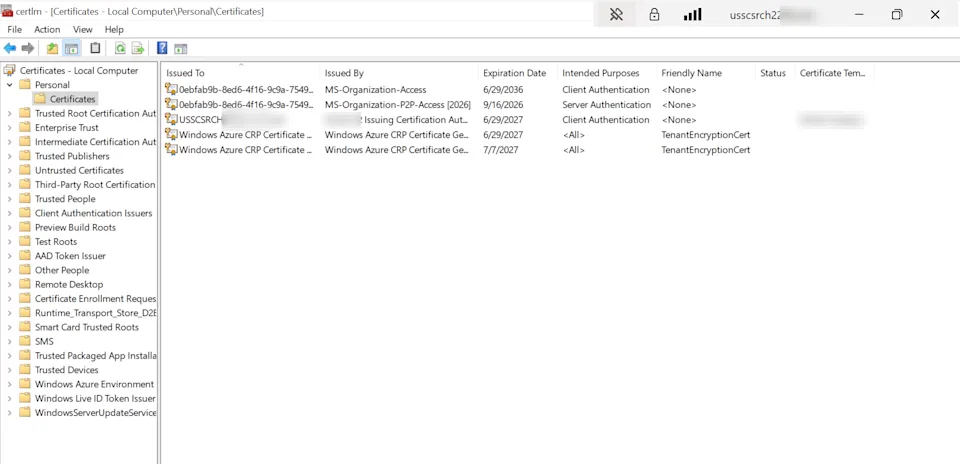
Windows certificate stores and Java truststores are separate. After you import the PFX, open certlm.msc and confirm the server certificate is under Certificates (Local Computer) → Personal → Certificates. That check is useful for Windows and for the load balancer. It still does not configure Solr’s JVM — Solr reads the keystore you set in solr.in.cmd.
$password = ConvertTo-SecureString $env:SOLR_KEYSTORE_PASSWORD -AsPlainText -Force
Import-PfxCertificate `
  -FilePath "C:\solr\solr-9.8.1\server\etc\solr-ssl.p12" `
  -CertStoreLocation "Cert:\LocalMachine\My" `
  -Password $password `
  -Exportable
If you have an existing JKS from an older Solr 8 node, convert it to PKCS12 (Command Prompt). Use a secret store for passwords — never commit them:
keytool -importkeystore ^
-srckeystore "C:\solr\solr-9.8.1\server\etc\solr-ssl.jks" ^
-srcstorepass %SOLR_KEYSTORE_PASSWORD% ^
-destkeystore "C:\solr\solr-9.8.1\server\etc\solr-ssl.p12" ^
-deststoretype PKCS12 ^
-deststorepass %SOLR_KEYSTORE_PASSWORD%
List the store and confirm the private key aliases. The keystore password and key password must match. A mismatch shows up as cannot recover key / UnrecoverableKeyException when Jetty starts.
Place the keystore and truststore under server\etc. In bin\solr.in.cmd (example for node 1):
set SOLR_JAVA_MEM=-Xms1024m -Xmx1024m
set "SOLR_HOST=solr01.example.internal"
set "SOLR_JETTY_HOST=0.0.0.0"
set "ZK_HOST=zk01:2181,zk02:2181,zk03:2181,zk04:2181,zk05:2181/solr"
set "SOLR_SSL_ENABLED=true"
set "SOLR_SSL_KEY_STORE=C:\solr\solr-9.8.1\server\etc\solr-ssl.p12"
set "SOLR_SSL_KEY_STORE_PASSWORD=%SOLR_KEYSTORE_PASSWORD%"
set "SOLR_SSL_TRUST_STORE=C:\solr\solr-9.8.1\server\etc\solr-ssl.p12"
set "SOLR_SSL_TRUST_STORE_PASSWORD=%SOLR_TRUSTSTORE_PASSWORD%"
set "SOLR_SSL_NEED_CLIENT_AUTH=false"
set "SOLR_SSL_WANT_CLIENT_AUTH=false"
set "SOLR_SSL_CHECK_PEER_NAME=true"
set "SOLR_OPTS=%SOLR_OPTS% -Dlog4j2.formatMsgNoLookups=true"
Use each node’s own SOLR_HOST. The 1 GB heap is a starting value for a small lab, not production sizing. Do not disable hostname verification to hide a trust error. Do not point ZK_HOST at localhost on a multi-node cluster.
If Solr nodes cannot reach each other on 8983:
New-NetFirewallRule -DisplayName "Solr 8983" -Direction Inbound -Protocol TCP -LocalPort 8983 -Action Allow
5. Start Solr and install the Windows service
Foreground start (Command Prompt) so you can read the first error:
cd /d C:\solr\solr-9.8.1
bin\solr.cmd start -c -f -p 8983 ^
-z "zk01:2181,zk02:2181,zk03:2181,zk04:2181,zk05:2181/solr"
-c is cloud mode; -f keeps the process in the foreground. Both (or all three) nodes must appear in the same Cloud → Nodes view with reachable HTTPS URLs. Stop the manual process before installing the service so two JVMs do not fight for 8983.
nssm install solr-9.8.1
A practical Application tab:
| Setting | Value |
|---|---|
| Path | C:\solr\solr-9.8.1\bin\solr.cmd |
| Startup directory | C:\solr\solr-9.8.1\bin |
| Arguments | start -c -f -p 8983 |
Solr still reads ZK_HOST (including /solr) from solr.in.cmd. You can also set ZK_HOST and SOLR_HOST on NSSM’s Environment tab — they must match the files on disk.
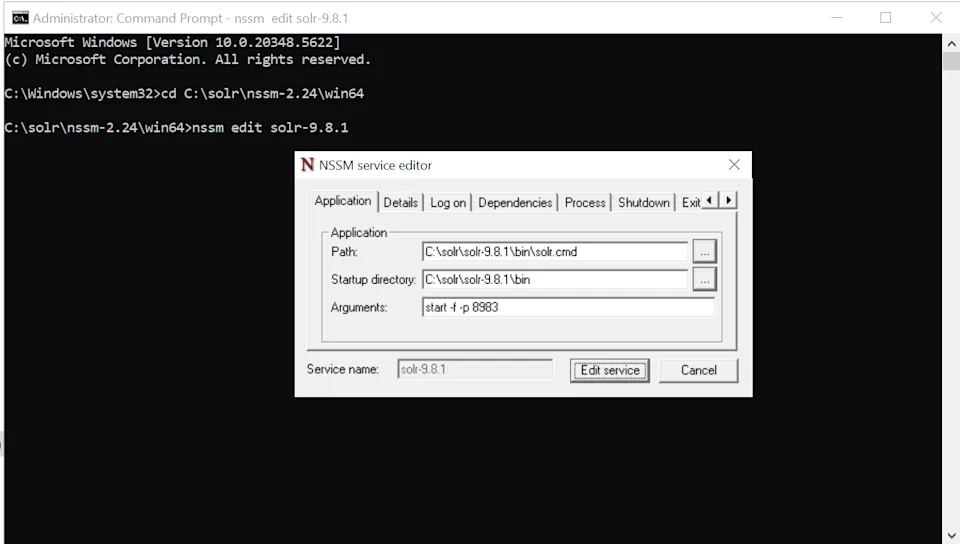
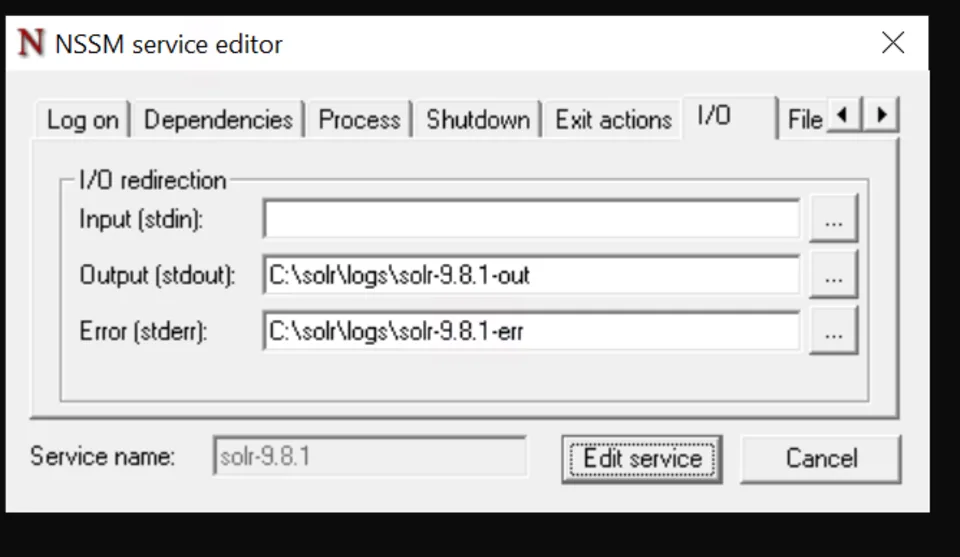
Redirect logs:
On the Environment tab, set ZK_HOST and SOLR_HOST so the service matches solr.in.cmd after a reboot:
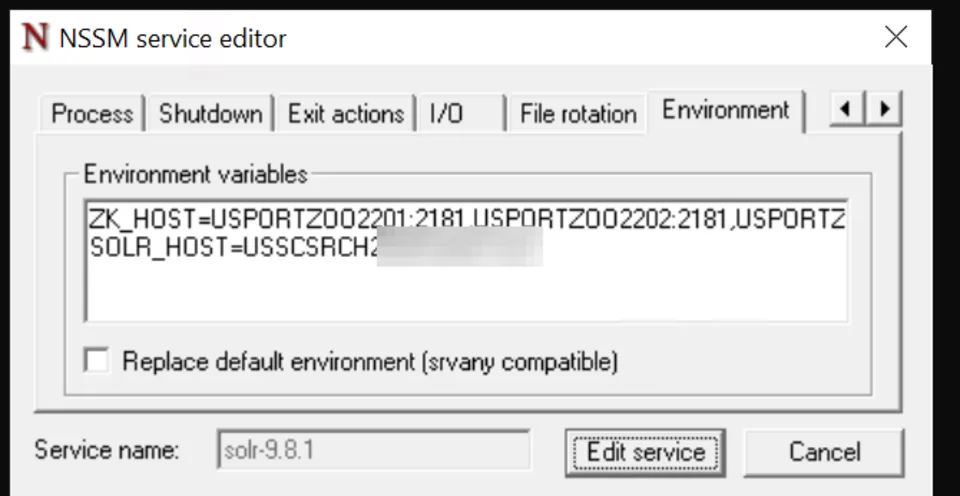
Create C:\solr\logs first. Start ZooKeeper, confirm quorum, then start Solr. After a reboot, confirm membership, the /solr chroot, and certificate trust again.
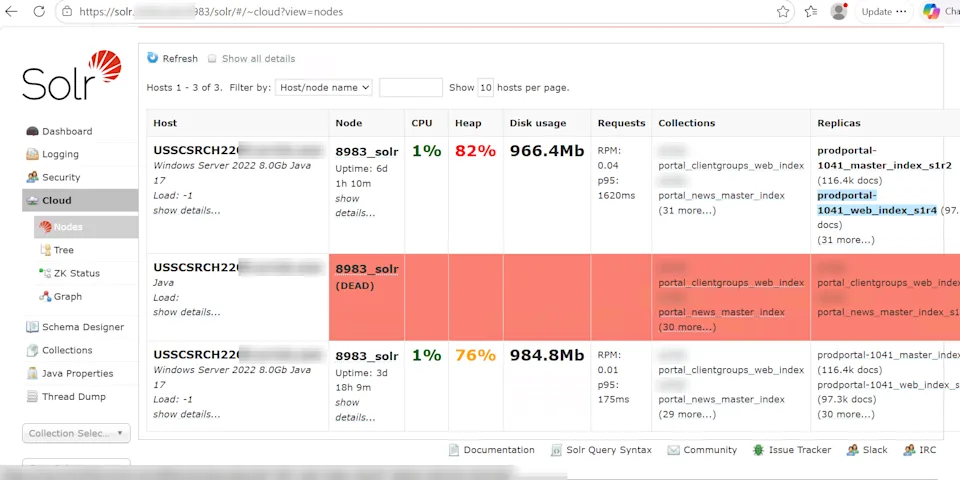
Open Solr Admin over HTTPS and check Cloud → Nodes. Every live node should show the same collections once you create them. A dead node in a red row is a replica problem, not “the dashboard is slow.”
6. Sitecore configset, collections, aliases
Use the configset and tooling for your Sitecore release. Do not overlay an old Solr 8.4 install onto 9.8.1, and do not copy raw Solr 8 index folders into 9.
Sitecore’s SolrCloud guidance typically sets _uniqueid as the required unique key and turns off automatic field creation. Keep the managed-schema workflow your release expects. maxShardsPerNode was removed in Solr 9 — do not send it on CREATE.
Upload once:
cd /d C:\solr\solr-9.8.1
bin\solr.cmd zk upconfig ^
-z "zk01:2181,zk02:2181,zk03:2181,zk04:2181,zk05:2181/solr" ^
-n sitecore-content-v1 ^
-d C:\solr\configsets\sitecore-content-v1\conf
Confirm sitecore-content-v1 under /solr/configs. Editing files on disk after upload does not update the cluster.
Create the live and rebuild collections (PowerShell). Add your org’s auth method — do not put credentials in a script you share.
$solrBase = 'https://solr01.example.internal:8983/solr'
$api = "$solrBase/admin/collections"
$collections = @('sitecore_web_index', 'sitecore_web_index_rebuild')
foreach ($name in $collections) {
  Invoke-RestMethod -Method Post -Uri $api -Body @{
    action = 'CREATE'
    name = $name
    numShards = 1
    nrtReplicas = 2
    'collection.configName' = 'sitecore-content-v1'
    wt = 'json'
  }
}
Both replicas for each shard should be active on different hosts. Do not rerun CREATE against an existing collection. Repeat for every Sitecore index that will live on this cluster.
Initialize switch-on-rebuild aliases once:
$aliases = @{
  sitecore_web_indexMainAlias = 'sitecore_web_index'
  sitecore_web_indexRebuildAlias = 'sitecore_web_index_rebuild'
}
foreach ($alias in $aliases.Keys) {
  Invoke-RestMethod -Method Post -Uri $api -Body @{
    action = 'CREATEALIAS'
    name = $alias
    collections = $aliases[$alias]
    wt = 'json'
  }
}
Invoke-RestMethod "${api}?action=LISTALIASES&wt=json"
After a rebuild, alias targets may switch. Do not reset them on every deployment. Repeat only for indexes configured for switch-on-rebuild, using Sitecore’s effective names. Budget disk for both collections and all replicas.
7. Point Sitecore at the cluster
Put Solr nodes behind the private load balancer with backend cert validation and a health probe. Fail one backend through the LB URL before Sitecore uses it.
Connection string on the applicable roles:
<add name="solr.search"
  connectionString="https://search.example.internal/solr;solrCloud=true" />
Use the key and port your release actually ships. When nodes are private, review ContentSearch.IndexingManager.DisplayShortStatistic so Indexing Manager does not try to hit nodes directly.
On the one instance that owns rebuilds, use the cloud switch type (merge into the existing index definition — keep crawlers and strategies):
<index id="sitecore_web_index"
  type="Sitecore.ContentSearch.SolrProvider.SwitchOnRebuildSolrCloudSearchIndex, Sitecore.ContentSearch.SolrProvider">
  <param desc="mainalias">$(id)MainAlias</param>
  <param desc="rebuildalias">$(id)RebuildAlias</param>
  <param desc="collection">$(id)</param>
  <param desc="rebuildcollection">$(id)_rebuild</param>
</index>
Other instances use SolrSearchIndex with core set to the main alias. Only one writer should own switching for a given index.
Then: populate managed schema for both collections, rebuild from Indexing Manager, and verify required fields in both destinations. Rebuild xConnect with its own tooling — a Content Search rebuild does not prove xConnect.
8. Prove search and failover
Publish a known test item and confirm the web result: language, security, facets, paging, computed fields.
Invoke-RestMethod "${api}?action=CLUSTERSTATUS&wt=json"
Invoke-RestMethod "${api}?action=LISTALIASES&wt=json"
Invoke-RestMethod "$solrBase/sitecore_web_indexMainAlias/select?q=*:*&rows=0"
numFound is useful, but Sitecore often writes multiple documents per item (languages/versions). A count gap is a reason to investigate, not automatic proof of data loss.
In non-production, run these one at a time and restore health between them:
| Test | What you should see |
|---|---|
| Stop one Solr node | Queries through the LB continue; remaining replicas active |
| Restart that node | Replicas recover to active |
| Stop one of five ZK members | Quorum remains; cluster ops continue |
| Rebuild the web index | Search stays usable; aliases switch to the new collection |
| Reboot a Windows host | Services return with the same /solr namespace and cert trust |
Never stop enough ZooKeeper voters to lose quorum during a routine rolling test. Replicas are not a backup: they also copy deletes.
For a Solr 8.4 → 9.8.1 move, prefer a parallel cluster and rebuild from source. Keep the old environment for a defined rollback window, and restore the matching Sitecore config if you roll back.
Troubleshooting
| Symptom | Look at first |
|---|---|
| Nodes form two clusters | ZK_HOST and the /solr suffix — they must match everywhere |
| No ZooKeeper quorum | myid, DNS, 2888/3888, NSSM stderr |
| Connection refused on ZK | Client port 2181 and the host you actually dialed |
cannot recover key | Keystore type, key password = store password, file ACLs |
| TLS / hostname failure | SANs vs advertised SOLR_HOST, trust chain on the client making the call |
| Sitecore dies when one Solr stops | Sitecore is not on the load balancer, or probes are wrong |
| Unknown fields / failed indexing | Configset on both collections |
| Rebuild “succeeds” but content is stale | Alias targets and which instance owns switching |
| Works interactively, fails as a service | Service account, JAVA_HOME, NSSM environment vs solr.in.cmd |
| Nodes cannot see each other | Firewall on 8983, and SOLR_JETTY_HOST=0.0.0.0 |
Read the earliest error in ZooKeeper, Solr, or Sitecore logs. A Sitecore timeout is often a Solr certificate problem that only shows on the node.
Official references worth keeping next to this lab: the Apache Solr reference guide, SolrCloud cluster types, and the ZooKeeper administrator’s guide.
That is the setup I would take into a lab before any production cutover: identical namespace, HTTPS declared up front, Windows services that survive a reboot, Sitecore on the load balancer, and failover proven with a real publish — not just a green dashboard.
Leave a comment